Registration Starter Kit
Starter Kit used as the basis for over 400 client projects.
Overview
I developed AirLST Suite Starter, aka Registration Starter Kit, a production-ready foundation for enterprise event registration platforms. Built with Nuxt 4 and Vue 3, this starter kit handles the full lifecycle of event management: from initial invitations through multi-step registration flows to final confirmation and attendee management. This is a migration from, and evolution of a previous boilerplate I created for Nuxt 2 to do the same thing.
The starter kit was designed to solve real-world challenges in event technology: dynamic form generation driven by server configuration, real-time capacity management to prevent overbooking, and complex guest relationship modeling (companions, recommendations). The result is a scalable, maintainable codebase that demonstrates advanced Vue architecture patterns and deep domain expertise in event management.
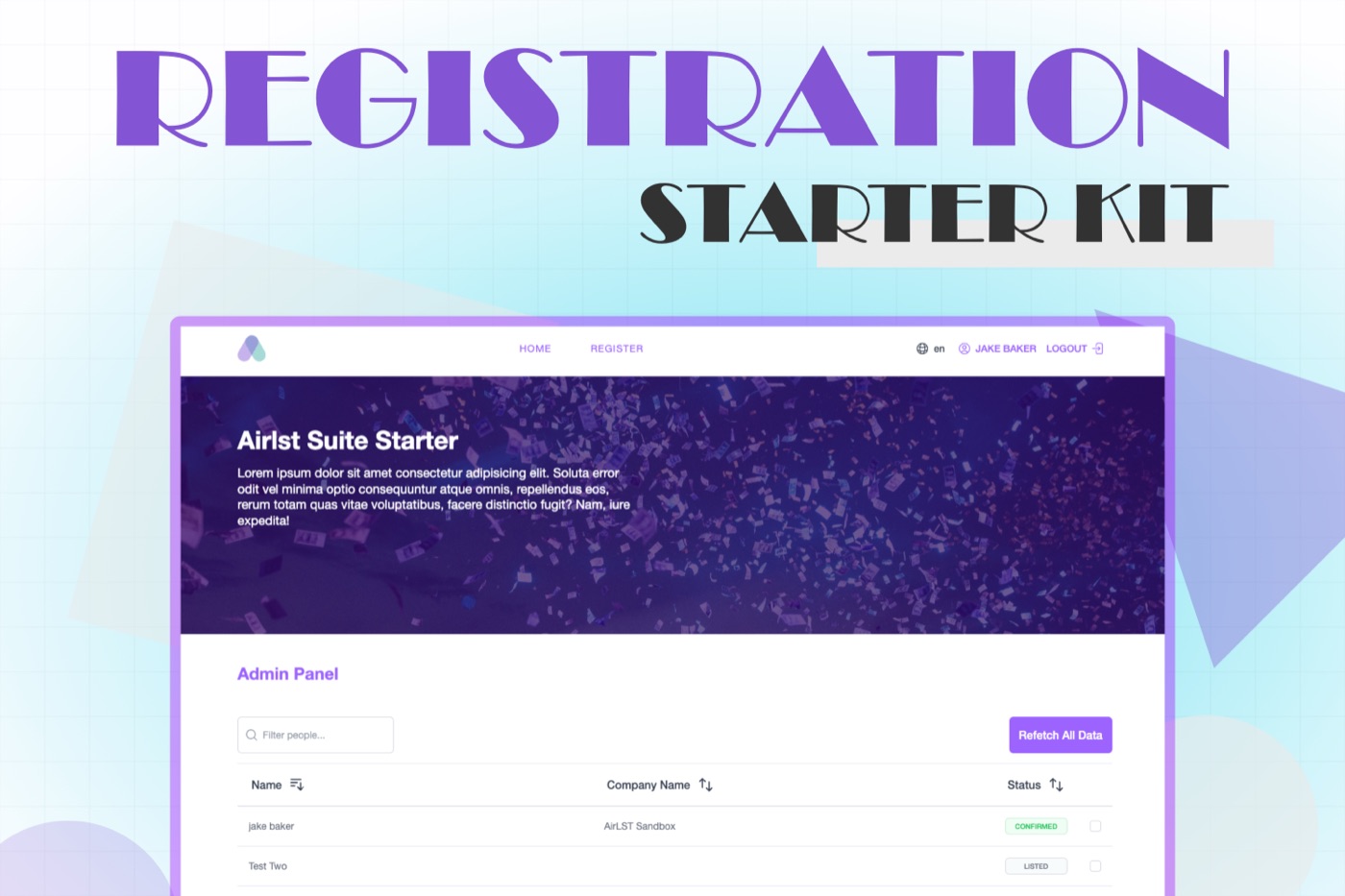
It doesn’t look like a killer in the design field. But that’s by design. The idea is that this is the base for all projects to start from and then we layer on the client specific changes for layout, styling, theming and functionality.
Tech Stack: Nuxt 4.1.2, Vue 3.5 (Composition API), Pinia, TypeScript, Tailwind CSS, Yup validation
The Challenge
Event registration systems face unique technical challenges that distinguish them from standard form applications:
- Complex State Machines: Registration isn’t a linear flow as users can be in different states (Invited, Confirmed, Cancelled) and the UI must adapt accordingly
- Nested Data Relationships: Managing companion guests (+1s) with cross-validation and shared capacity constraints
- Real-Time Availability: Preventing overbooking when multiple users select the same limited-capacity options simultaneously
- Dynamic Form Generation: Supporting event-specific custom fields with varying validation rules
- Multi-Tenant Architecture: One codebase serving multiple events with different configurations and branding
Technical Approach
Architecture: Composable-First Design
I structured the application around Vue 3’s Composition API, extracting all business logic into reusable composables. This pattern provides several benefits:
- Testability: Pure functions that can be unit tested independently
- Reusability: Logic shared across components without inheritance complexity
- Type Safety: Full TypeScript support with proper inference
- Maintainability: Clear separation between presentation and business logic
Key Composables:
useForm()- Dynamic option mapping with capacity trackinguseSuite()- Guest model factories and relationship managementuseFormValidations()- Centralized Yup schemas with i18n integrationuseApi()- Type-safe API wrapper with authentication
State Management: Domain-Driven Stores
Using Pinia, I organized state into four domain-specific stores:
// Event Store - Global event context
export const useEventStore = defineStore('event', () => {
	const event = ref(null)
	const getEvent = async () => {
		/* Fetch event config */
	}
	return { event, getEvent }
})

// Form Store - Registration state
export const useFormStore = defineStore('form', () => {
	const form = ref(null)
	const setFormData = () => {
		/* Intelligent form initialization */
	}
	return { form, setFormData, reset }
})
This separation ensures:
- Form resets don’t corrupt session data
- Event configuration is cached and shared
- Authentication state is isolated from transient UI state
Component Architecture: Slot-Based Composition
Registration flows are managed through a flexible view system:
<BaseViews :views="['start', 'confirming', 'confirmed', 'cancelled']">
  <template #start><RegistrationStart /></template>
  <template #confirming><RegistrationConfirming /></template>
  <template #confirmed><RegistrationConfirmed /></template>
</BaseViews>
The BaseViews component handles conditional rendering based on reactive state from the steps store, enabling clean separation of each registration phase.
Key Features & Solutions
1. Real-Time Capacity Management
The Problem: Events often have limited-capacity options (e.g., 50 seats for a workshop). When a user selects an option but hasn’t submitted yet, those selections should still count toward the capacity to prevent overbooking.
My Solution: I built a sophisticated capacity tracking system in the useForm composable that:
- Aggregates all selections across the main guest and all companion guests
- Distinguishes between “saved” selections (already in the database) and “new” selections (pending submission)
- Calculates remaining capacity in real-time, adjusting the UI to disable sold-out options
const mapGroupOptions = (guestSelectRef, companionGuestSelectRef) => {
	const allSelections = [
		guestSelectRef.value,
		...companionGuestSelectRef.value
	].flat()

	const newSelections = {}
	allSelections.forEach((opt) => {
		if (opt.selected && !opt.saved) {
			newSelections[opt.value] = (newSelections[opt.value] || 0) + 1
		}
	})

	const remaining = Math.max(incomingRemaining - adjustment, 0)
	return {
		disabled: remaining === 0,
		label: remaining >= 1 ? `${baseLabel} [${remaining} remaining]` : baseLabel
	}
}
Business Impact: Prevents user frustration from failed submissions due to race conditions, improving conversion rates.
2. Multi-Guest Transaction Handling
The Problem: Users registering with companions need to fill out multiple forms, but all data should be submitted as a single atomic transaction. Validation errors for any guest (main or companion) must be mapped back to the correct form field.
My Solution: I implemented a hierarchical guest model with role-based validation:
const createCompanionGuest = () => {
	const companion = cloneDeep(guestModel)
	companion.id = `local-${uuidv4()}`
	companion.role = 'companion'
	return companion
}
For server error handling, I built a mapping system that translates API errors to nested form paths:
if (role === 'companion') {
	const index = form.value.companion_guests.findIndex((i) => i.id === id)
	name = `companion_guests.${index}.`
}
serverErrors.value.push({ message: value[0].message, name: `${name}${key}` })
formRef.value.setErrors(serverErrors.value)
UX Enhancement: After adding a companion guest, the form automatically focuses the first input field, reducing friction and improving completion rates.
3. Dynamic Form Generation with Validation
The Problem: Different events require different registration fields. The frontend must dynamically render forms based on server-provided field definitions while maintaining robust client-side validation.
My Solution: I created a mapping system that transforms server field definitions into validated form inputs:
- Reads event-specific field configurations from the API
- Maps field types to appropriate input components (text, select, checkbox, file upload)
- Generates Yup validation schemas dynamically based on field requirements
- Supports conditional validation (e.g., companions skip certain steps)
Progressive Disclosure: Validation occurs per-step in the multi-step form, so users get immediate feedback without being overwhelmed by all validation errors at once.
4. Intelligent Error UX
When validation fails, the application:
- Auto-scrolls to the first error with smooth behavior
- Auto-focuses the invalid input for immediate correction
- Displays contextualized error messages using i18n for multiple languages
await nextTick()
setTimeout(() => {
	const element = document.getElementById(event.errors[0].id)
	element?.focus()
	element?.scrollIntoView({ behavior: 'smooth', block: 'center' })
}, 300)
Technical Highlights
Modern Vue Patterns
Template Refs with Component Exposure:
I used Vue 3’s useTemplateRef() to access child component validation schemas from the parent, enabling per-step validation:
const step1Ref = useTemplateRef('step1Ref')
const schema = computed(() => ({
	1: step1Ref.value?.schema || yup.object(),
	2: step2Ref.value?.schema || yup.object()
}))
Computed Properties for Derived State: Complex selections with nested dependencies are modeled as computed properties with automatic tracking:
const guest_select = computed(() =>
	mapOptions({
		field: 'field_2',
		showRemaining: true,
		event,
		form,
		user
	})
)

const select_options_grouped = computed(() =>
	mapGroupOptions(guest_select, companion_guest_select)
)
Performance Optimizations
- Code Splitting: Nuxt automatically splits pages and dynamically imports heavy components
- Asset Optimization: Client-side image compression with
compressorjsbefore upload - Memory Management: Store reset patterns prevent memory leaks in long-running sessions
- Efficient Rendering: Fixed-height tables with overflow scrolling for large guest lists
TypeScript Integration
I leveraged TypeScript for type-safe API calls and composables:
export function useAPI<T>(
	url: string | (() => string),
	options?: UseFetchOptions<T>
) {
	return useFetch(url, {
		...options,
		$fetch: useNuxtApp().$api as typeof $fetch
	})
}
Internationalization
Full i18n support with:
- Locale-aware routing
- Dynamic content translation for event-specific terminology
- Localized validation error messages
- Cultural date/time formatting
Domain Expertise: Event Management
This project demonstrates specialized knowledge of event technology requirements:
Registration Flow Optimization
- Drop-off Prevention: Auto-save functionality and progress preservation
- Mobile-First Design: Touch-optimized inputs and responsive breakpoints
- Progressive Enhancement: Critical paths work even with JavaScript errors
Capacity & Conflict Management
- Overbooking Prevention: Local capacity calculations with server-side validation backup
- Session Conflicts: Multi-track event support with conflict detection
- Guest Relationship Validation: Cross-validation between related guests
Admin/Organizer Tools
- Guest Dashboard: Sortable tables with global search and bulk operations
- Excel Integration: Import/export guest lists with custom field mapping
- Real-Time Status Indicators: Color-coded badges for registration states
Results & Impact
Architectural Benefits:
- Maintainable: Clear separation of concerns with composable-first architecture
- Extensible: New event types can be added without core code changes
- Scalable: Designed to handle enterprise-level events with hundreds of attendees
- Type-Safe: Full TypeScript coverage reduces runtime errors
User Experience:
- Multi-step forms with progressive disclosure reduce cognitive load
- Real-time validation provides immediate feedback
- Auto-focus and scroll management creates seamless user flows
- Mobile-responsive design captures on-the-go registrations
Developer Experience:
- Hot module replacement for rapid development
- Comprehensive error messages aid debugging
- Modular store architecture simplifies state management
- Reusable composables reduce code duplication
Key Takeaways
Building this event registration platform reinforced several important principles:
-
Domain Modeling Matters: The quality of your data structures (Guest, Event, Form) determines how easy complex features are to implement. Investing time in thoughtful modeling pays dividends.
-
Composition Over Inheritance: Vue 3’s Composition API enabled me to share logic without component inheritance, resulting in cleaner, more testable code.
-
User Context is State: Treating registration as a state machine (not just a form) enabled dynamic, adaptive UX that handles edge cases gracefully.
-
Validation is Multi-Layered: Client-side validation (Yup) provides immediate feedback, but robust server error mapping is essential for data integrity.
-
Real-Time Calculations Create Complexity: Managing capacity across multiple related entities (main guest + companions) requires careful state aggregation and reactivity.
This project showcases my ability to build production-grade Vue applications with sophisticated state management, complex business logic, and deep attention to user experience, all while maintaining clean, maintainable architecture patterns.